CTk-Text-To-CSV-JSON
🔄 CTk Text To CSV/JSON Converter
A modern CustomTkinter application to convert plain text into CSV or JSON format. This tool is perfect for data preprocessing, exporting structured data and automating text-to-data workflows with an intuitive GUI.
✨ Features
- 📝 Convert plain text input to CSV or JSON
- 🎨 Modern CustomTkinter UI with Light/Dark mode
- ⚡ Fast and responsive interface
- 💾 Save files directly from the app
- 🔧 Easy to customize input parsing and export format
- 🖥 Cross-platform: Windows, Linux, macOS
- 💡 Beginner-friendly, minimal dependencies
📌 Technologies Used
Tkinter
Tkinter is Python’s standard GUI library used for building cross-platform desktop applications.
CustomTkinter
CustomTkinter extends Tkinter with:
- Modern, consistent design
- Light & Dark themes
- High-DPI scaling
- Fully customizable modern widgets
Together, they ensure a smooth UI experience on Windows, macOS and Linux.
| Component | Description |
|---|---|
| Language | Python 3.x |
| GUI Framework | CustomTkinter |
| Core Libraries | Tkinter, CustomTkinter |
🧰 Installation Steps
Step 1. Clone the repository
git clone https://github.com/iamx-ariful-islam/CTk-Text-To-CSV-JSON.git
cd CTk-Text-To-CSV-JSON
Step 2. Install Python Dependencies
The requirements.txt file, lists of all the Python libraries that “ctk text to csv json” depends on and installs those packages from the file:
pip install -r requirements.txt
# or (Linux/MacOS)
sudo pip install -r requirements.txt
Step 3. Run the Application
python main.py
📂 Folder Structure
Here’s the structure of the CTk Text To CSV JSON project:
CTk-Text-To-CSV-JSON/
│
├── screenshots/
├── main.py
│── LICENSE
├── notes.txt
├── README.md
└── requirments.txt
🖼️ Screenshots
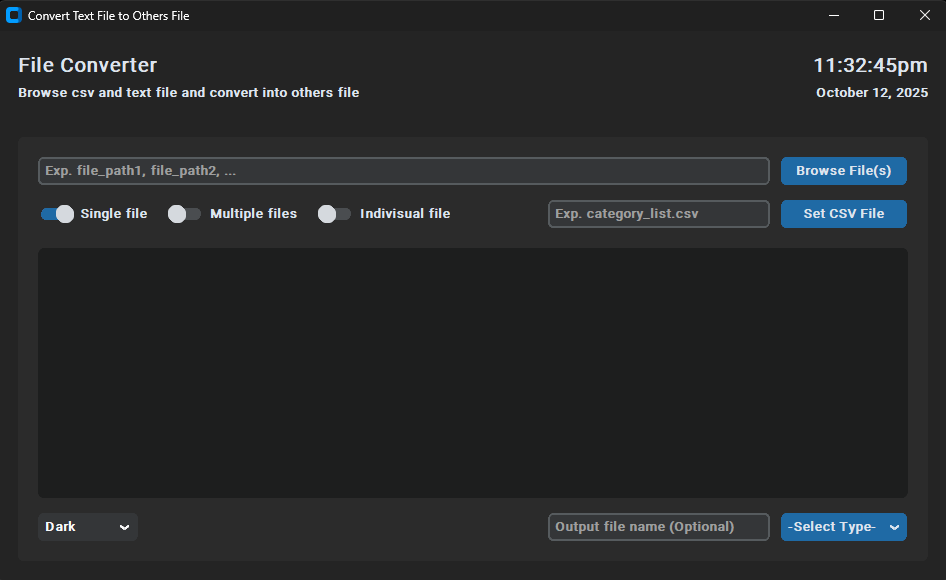
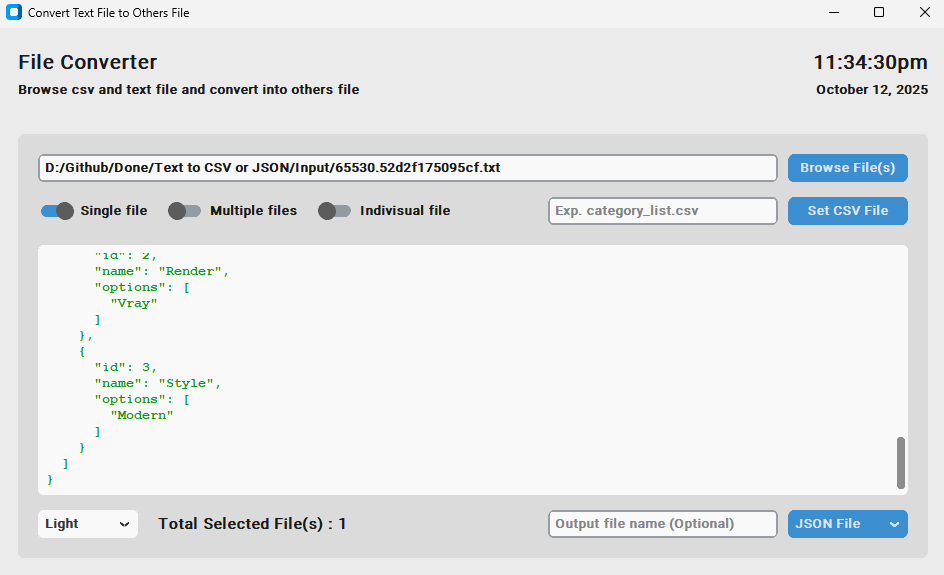
Here are some screenshots of the CTk Text To CSV JSON project:
Main Window - Dark Mode
Output Main Window - Light Mode
📄 Notes File (How it works)
View full notes here: 👉 notes.txt
- Show file(s) full path with comma separated
- Open text file dialog box by clicking “Browse File(s)”
- Open csv file dialog box by clicking “Set CSV File”
- Browse single file at a time
- Browse multiple files at a time
- Generate indivisual output file or not
- Enter output file name (Optional)
- Show the output result data
- Change/Select the theme mode (Default: Dark)
- Select the output file type for generate file(s) [TEXT File, JSON File, CSV File]
🤝 Contributing
Contributions, suggestions, and feedback are always welcome! ❤️
To contribute:
- Fork the repository
- Create a new branch (
feature/new-feature) - Commit your changes
- Push and submit a Pull Request
💬 You can also open an issue if you’d like to discuss a feature or report a bug.
🌐 For more or connect with me




📜 License
The MIT License (MIT)
💖 Thank You for Visiting!
“Good design is about making things simple yet significant”
— Md. Ariful Islam